Ask anyone who drives regularly where they do their best thinking and a lot of them will say the same thing: in the car. It makes sense. As we covered in the cost of a forgotten idea, a familiar drive is a low-cognitive-load activity — exactly the conditions that let your mind wander into its best work.
The problem is obvious. The one place ideas reliably show up is the one place you absolutely cannot stop to write them down. So most people do nothing, and the idea is gone by the next junction. The good news: there is a safe, legal, genuinely fast way to capture thoughts at the wheel. It just isn't the way most people reach for first.
Why your notes app doesn't work in the car
If you've ever wondered why you can't just open Notes on your car's screen, here's the answer: Apple won't let it. CarPlay has strict design rules, and anything that encourages you to read long text or type while moving simply isn't allowed onto the dashboard. That's not a bug — it's a deliberate safety decision, and a sensible one.
The result, though, is that the entire category of note-taking is mostly absent from CarPlay. You get maps, music, messages and calls — and for capturing a thought, you're left to improvise. Which is where the bad habits come in.
The workarounds — and why they fail
Faced with a locked-down dashboard, drivers fall back on two hacks. Both technically work and both quietly let ideas rot:
- Texting yourself. You dictate a message into your own thread. It captures the words, but they land in a chat you'll scroll past, mixed in with actual conversations, impossible to organise, and gone the moment a real message arrives on top of it.
- A generic voice memo. You hit record and talk. Now you've got an audio file — number 47 in a list of untitled recordings you will never, ever play back. The idea is technically saved and practically lost.
Both share the same flaw: capturing is the easy part. Retrieving and acting on it later is where everything breaks. A pile of memos or a flooded message thread isn't a thinking system. It's a graveyard with good intentions.
When did you last go back and listen to a voice memo you recorded while driving? For most people the honest answer is "never." If you're not retrieving them, you're not really capturing — you're just feeling like you did.
What "safe capture" actually looks like
The road-safety principle is simple: your eyes belong on the road and your hands on the wheel. Anything you do in the car has to fit around that, not compete with it. A safe capture method is:
- Hands-free or one-touch. A single tap of a large target — or a voice trigger — not a sequence of precise interactions.
- Glance-free. You should never need to read the screen to know it's working. Audio and haptic confirmation do the job.
- Voice-first. You talk; the device writes. Speaking is natural at the wheel in a way typing never will be.
- Self-filing. The note sorts itself, so you're not making decisions or tidying up mid-drive.
Notice that this is exactly how you already use CarPlay for navigation and calls — you speak, you glance occasionally, you keep driving. Capturing an idea should feel no different from asking for directions.
The CarPlay-native approach
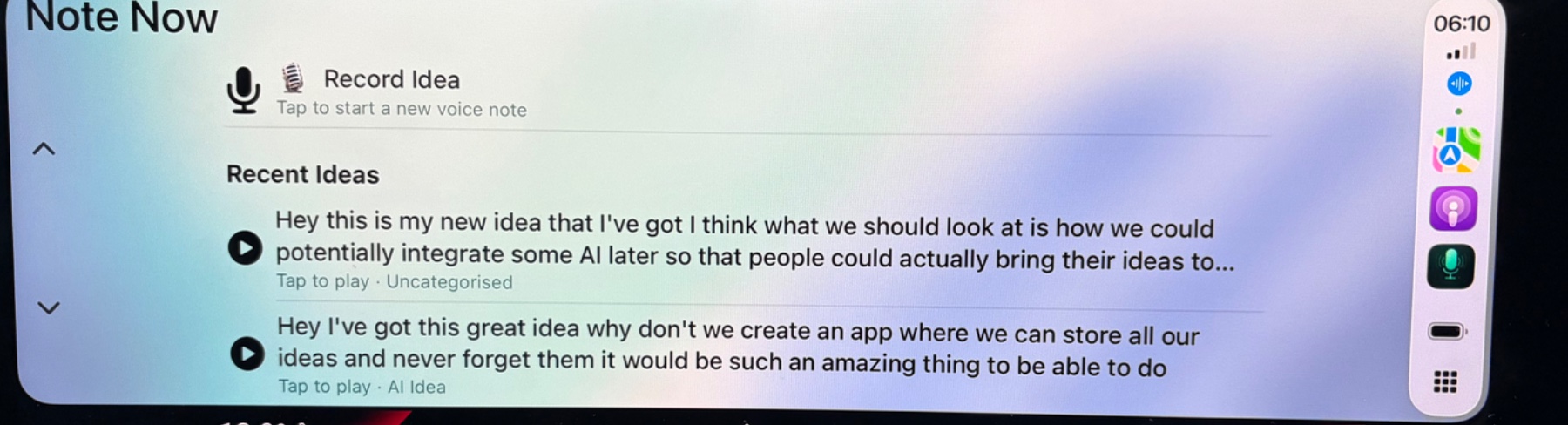
This is the gap Note Now was built to fill. Rather than fight CarPlay's rules, it works within them: a proper notes app that lives right on the dashboard, next to Maps and your music, designed from the start for glance-free, voice-first capture.
The flow is deliberately boring, which is the point. One tap on the big Record target. You speak your idea. iOS transcribes it on-device, in real time. It saves automatically into the right group, timestamped, and it's waiting for you — as clean text, not a mystery audio file — the moment you're back at your desk. No fishing through a message thread, no replaying memos, no decisions made at 70mph.
Because the transcription runs on your device, it also works without a signal and keeps your half-formed ideas private. There's no "open the app, wait, find the right place" tax. The friction that kills ideas is gone, and the commute you were going to spend anyway turns into the most productive thinking time in your day.
Turn your commute into a brainstorming session.
Note Now sits right on your CarPlay dashboard. One tap, speak, keep driving — your idea is transcribed and filed before the light turns green. Free to download.
Download Note Now — Free